

1
/
of
9
Unbranded
XL4015 5A 75W DC-DC Step Down Buck Converter with LED display PLUS OPTIONAL CASE
XL4015 5A 75W DC-DC Step Down Buck Converter with LED display PLUS OPTIONAL CASE
Regular price
£4.95 GBP
Regular price
Sale price
£4.95 GBP
Unit price
/
per
Couldn't load pickup availability
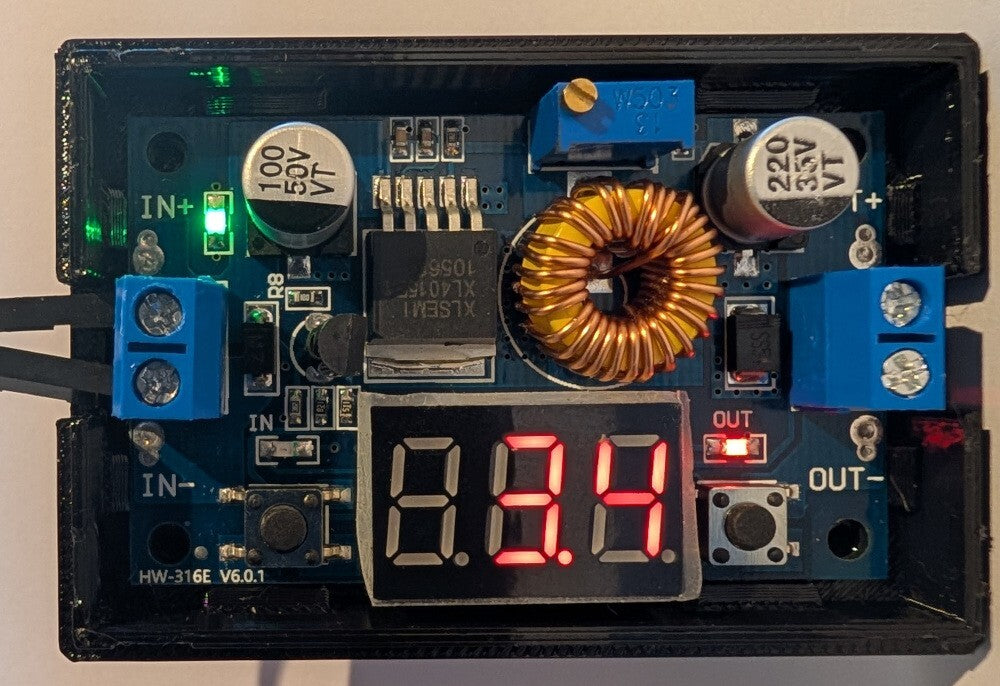
This listing is for a 5A DC-DC adjustable step-down module with a built-in LED voltmeter display, with optional case.
It comes with 4 brass standoffs, matching nuts, and a heatsink with peel-off tape.
Turn the bronze screw to change output voltage. Clockwise increases, anticlockwise decreases. On first use, you may have to turn it anticlockwise a number of times until the output starts changing.
Features include:
- LED power indicator.
- Button to switch the display to show input voltage or output voltage on the LED display.
- Button to turn the display off.
- LED to indicate that the display is showing either the input or output voltage.
- Input voltage: 4 to 38 VDC (do not exceed 38 volts).
- Output voltage: 1.25 to 36 VDC (adjustable).
- Output current: 0-5A
- Output power: 75W
- Efficiency: Up to 96%
- A calibration mechanism to ensure the display is perfectly accurate (see below for steps).
Note that the input voltage must be higher than the output voltage. This is a step-
down
converter.
Calibration routine - Output voltage
Step 1: Ensure the "OUT" LED is lit, showing the output voltage.
Step 2: Press the rightmost button for more than 2 seconds, then release it.
Step 3: The voltmeter "OUT" LED flashes.
Step 4: Tap the leftmost or rightmost button until the LED display is matching your calibrated readout (for example, your multi-meter).
Step 5: Hold the rightmost button to lock in the completed calibration.
Calibration routine - Input voltage
Step 1: Ensure the "IN" LED is lit, showing the input voltage.
Step 2: Press the rightmost button for more than 2 seconds, then release it.
Step 3: The voltmeter "IN" LED flashes.
Step 4: Tap the leftmost or rightmost button until the LED display is matching your calibrated readout (for example, your desktop DC power source or multi-meter).
Step 5: Hold the rightmost button to lock in the completed calibration.
Tell me more about the case:
Designed and manufactured uniquely by Hobby Stuff, is this case for your XL4015 LED module.
As usual, we have done way too much over-engineering, resulting in the following features:
- Translucent windows : see the green power indicator and which voltage is being displayed (i.e. input or output LED).
- Soft-click buttons : push on the case buttons to press your underlying module buttons for display on/off and input/output display selection.
- Air vents : to help dissipate the heat from your hardworking module.
- Wiring holes : run your input wires easily into the input and output connectors.
- Connector screw holes : easily tighten or loosen the connectors directly.
- Chunky : with a 3mm wall, this is one tough cookie.
- PETG construction : making the case more heat resistant and tougher than anything else out there made from typical PLA.
- Unique design : Hobby Stuff designed this case from scratch, specifically to best fit these modules
- Optional screw-down : the case will snugly fit your module, but if desired, you can add your own screws to affix it to the base of the case.
- Shimmering finish : Our favorite part. The top and bottom surfaces sparkle under the right light!
- External dimensions : 70 x 47 x 19 mm.
All cases are kept pre-made so there is no manufacturing delay when getting them shipped to you!
Share